
Car Dealership Tycoon Redeem Codes in Settings
Cog, Enter code, plus button — the exact loop Foxzie uses, including every common failure.
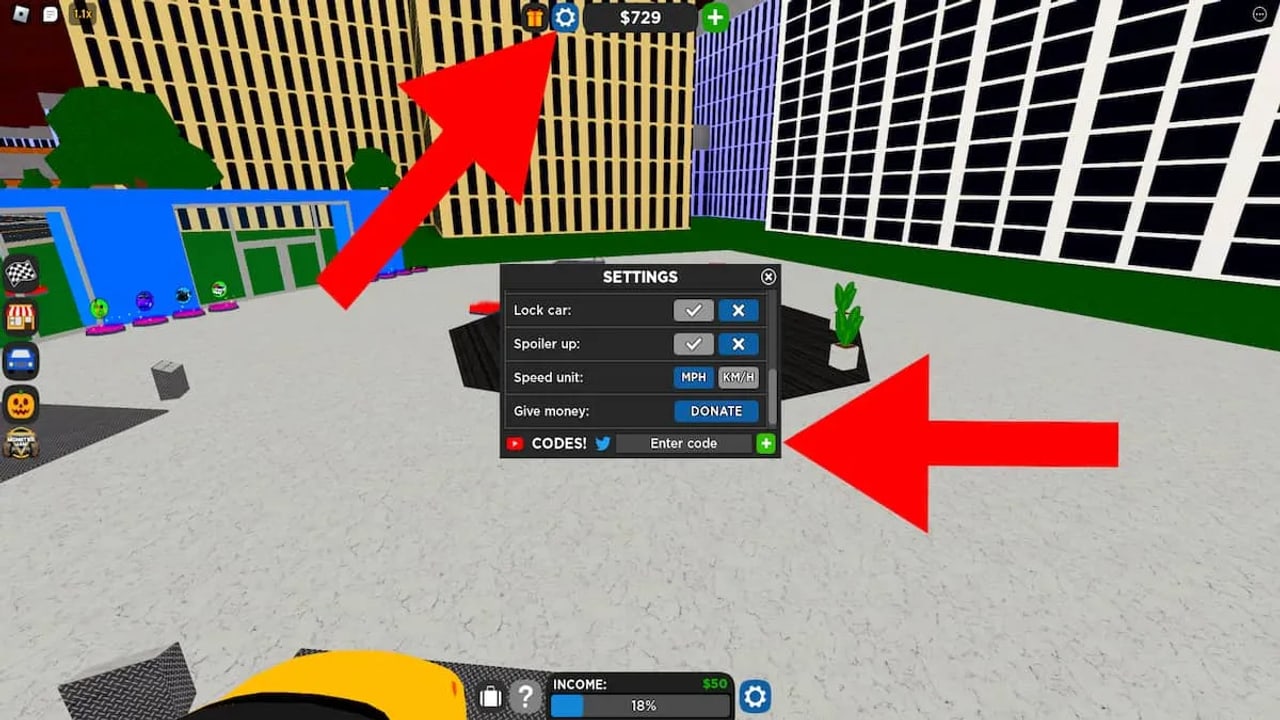
Car Dealership Tycoon hides codes inside Settings. There is no giant Redeem button on the main HUD, no chat command, and no website form. If you joined after 27 March 2018 — which is everyone still playing — you already have the live game; you just need the cog. This page is the click-by-click path from a fresh 15-player server to cash in the wallet, plus the error messages that make people think a live code is dead.
Keep the working codes table open in a second window. After you finish here, dump every still-live string before you start building pads. If a row fails, confirm it against expired codes instead of hammering +.
Before you touch Settings
Join the Roblox game page and wait until the dealership lot, minimap, and top bar finish loading. Redeeming during the spawn fade is a common reason the + button appears to do nothing. You do not need a finished dealership, a Trading Hub unlock, or a rare car. Codes are account-wide and work on a brand-new save as long as the HUD is up.
Use a keyboard if you can. On a phone, the Settings window plus the Roblox chat bar will eat your first paste. Mute chat if you keep sending the code to the 15-player server instead of the text box.
If this is your first session, pair the redeem with Getting Started and the controls page so you can actually drive the car you just bought with the cash.
Step-by-step redeem
- Launch Car Dealership Tycoon and stay in the main world. You do not need the Trading Hub (32 players) for codes.
- Click the cog at the top of the screen. That icon is Settings, not the garage, not the phone, not the trade menu.
- Find Enter code. The field sits near the bottom of the Settings window. Scroll if your resolution clips it.
- Paste one code. Copy from the Codes Hub table. Do not retype from memory. Do not add a space at the end. Do not lowercase it “to be safe” — these strings are case sensitive.
- Press the + button next to the box. That is the redeem control. Enter on the keyboard is not a reliable substitute.
- Watch the toast. A success message credits cash immediately. A car reward such as FOXZIER8 lands in the garage rather than the wallet. Failures are covered below.
- Repeat for the next row. Clear the box between codes. Pasting FOGISCOMING onto leftover AUTUMNSOON letters creates a nonsense string the game treats as invalid.
That is the entire official loop. Foxzie has not added a second redeem path. Discord bots, “free robux” sites, and random loadstrings that claim to inject codes are not the game. Those are how accounts get stolen. Stay inside Settings.
What success looks like
Cash codes add dollars to the same balance you use in the vehicle shop. A $80,000 or $100,000 hit is enough for a usable early display car; a $15,000 FOXZIE drop is a rounding error. Open the shop after a big redeem and buy something that earns on a pad and can race — see how to make money and vehicles before you park a trophy on the lot that never leaves first gear.
Car codes skip the shop. FOXZIER8 is the live example: the Foxzie Edition Audi R8 appears in your garage. You still need to spawn it and, if you want passive income, place it on a display pad. Completing a dealership is a separate grind; code cars do not skip construction.
Troubleshooting
Extra spaces
Copy-paste from a table often brings a leading or trailing space. The Enter code box will look correct and still fail. Delete the field, paste again, and tap End to confirm the cursor sits on the last letter, not one space beyond it.
Caps
fogiscoming is not FOGISCOMING. Foxzie is not FOXZIE. Almost every live cash string is full uppercase. If you typed from a thumbnail, recopy from the working list.
Already redeemed
Each Roblox account can use a code once. A new phone, a new PC, or a fresh 15-player server does not reset that flag. If you redeemed BURNOUT last year, it will never pay again on this account. Alts are separate accounts with their own one-time claims.
Expired
Foxzie kills strings without a timer. A code that worked this morning can return Invalid or Expired after an update ping. Check expired codes. If it is already archived, stop retrying. If it is still on the working table, wait one server hop — a lagged session sometimes eats the first + press — then try once more. A second failure means the roundup is stale.
Similar names
FOXZIE ($15,000), FOXZIER8 (Audi R8), and the dead R8FOXZIE string are three different tokens. 4THJULY has a digit. MX5CUP is letters and a number with no spaces. One missing character is enough for Invalid.
HUD not ready
If you opened Settings during the spawn cut, close it, wait for the minimap, and open the cog again. Private servers and custom servers use the same Settings path; they are not a special redeem mode.
Wrong window
Players confuse the cog with the phone app, the garage search, or the trade invite box. If you do not see the literal label Enter code, you are in the wrong panel. Close everything and click the top-bar cog only.
After you redeem
Do not idle with a fat wallet. Put a car on every empty pad, then take a race-capable vehicle to races. Code cash is a spike; pad income plus race payouts are the loop that actually finishes a lot. When you outgrow starter metal, check the starter cars list before you dump the rest into a limited you cannot race well.
New strings usually land in the official Discord first. The Trello board is for bugs and improvements, not codes — do not wait there for FOGISCOMING-style drops. Latest update notes on this wiki flag patches that often ship a new string the same day.
If Settings itself is broken (cog missing, + does nothing on every code including FOXZIE), that is a client bug, not an expired list. Rejoin, then check the Trello and Discord for a known issue before you assume Foxzie removed codes from the game. They have not. The box is still the official redeem path in 2026.
Frequently Asked Questions
Quick answers for codes, cars, trading, and dealership progress.
Where is the code box in Car Dealership Tycoon?
Click the Settings cog at the top of the HUD. The Enter code field sits near the bottom of that window, with a + button beside it. There is no separate Codes menu on the main bar.
Why does my code say invalid when I just copied it?
Most often a hidden space, a lowercase paste, or a lookalike string (FOXZIE versus FOXZIER8). Clear the box, paste once from the working table, and press +. If it still fails, the code is expired or already redeemed on this account.
Can I redeem the same code on two devices?
No. Redemption is per Roblox account, not per device or per server. A second computer will return already redeemed.
Do I need to finish a dealership first?
No. Codes work on a new save as soon as the HUD loads. You do not need Trading Hub access, a completed lot, or a game pass.
Should I redeem in the Trading Hub?
You can, but you do not have to. The Settings cog works in the main 15-player world. Redeem there, then spend the cash on pads and a race car.
Is there a codes website or bot I should use instead?
No. Only the in-game Settings box is official. Third-party redeem bots and “inject code” scripts are a common way to lose the account.