
Car Dealership Tycoon Controls
WASD, Space handbrake, garage spawns, HUD menus, and the cyan Auto Drive portal.
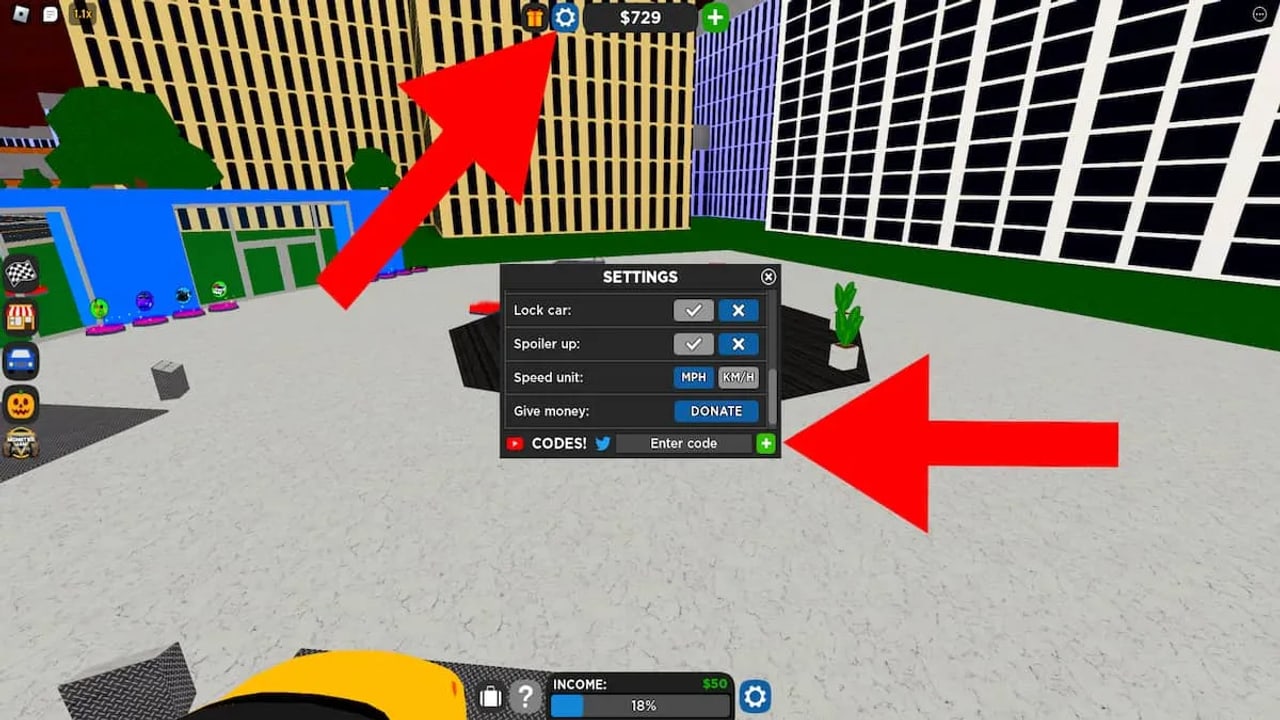
Car Dealership Tycoon plays on PC, mobile, and console through Roblox. The world is a 15-player driving map with tycoon buttons on your plot. This page is the input map and the HUD tour. It will not make you fast. It will stop you from missing Settings, codes, races, and the Auto Drive portal.
New accounts should keep getting started open in another tab. Money destinations are on how to make money.
PC driving
- W throttle, S brake/reverse, A/D steer.
- Space is the handbrake / e-brake. Tap it to break traction for a drift. Hold it to lock the rear in a panic stop.
- Mouse looks around. Click and drag if the camera is in free-look. Scroll to adjust distance when the game allows it.
- Enter and exit a vehicle by walking up to it and using the proximity prompt (the on-screen button Roblox shows). You do not have a separate “all cars” hotkey.
- Shift and extra binds can appear if you remapped Roblox or use a controller. Default advice on this wiki assumes WASD plus Space.
Burnouts on PC are often W+S together on a rear-wheel-drive car. That is a trick, not a requirement.
Mobile
Mobile uses an on-screen stick for steer and throttle plus a handbrake button. The same proximity prompt enters and exits cars. Because the HUD already fills the screen, hide chat when you are trying to drift. Thumb placement matters more than car price: a cheap RWD you can tap-brake will out-drift a hypercar you cannot see past the UI.
If the stick feels inverted or too sensitive, open the top cog and look for camera / controls toggles. Foxzie has shuffled that panel across updates, so use the labels in your build, not a 2022 screenshot.
Garage spawn and multiple cars
Click a car in the garage UI to spawn it on the lot or at your current spawn point. You normally drive one vehicle at a time. Season 32’s “spawn up to 3 vehicles” gamepass is the paid exception if you want several cars out for photos or a meet. Without that pass, despawn or switch from the garage instead of abandoning a pile in the street.
VIP+ (real-money subscription, not the 500 Robux VIP pass) has also included a two-car spawn perk while subscribed. Perks vanish if the subscription lapses. Do not build a workflow on a perk you do not currently own.
HUD: top cog, left menus, plot percent
Top of the screen:
- Cog / Settings. Codes are typed at the bottom of this window. Graphics, trade request mutes, and inventory privacy live here too. Full redeem steps are on how to redeem codes.
- Shop, season, and event widgets. Limiteds, gamepasses (2x Money at 399 Robux, VIP at 500), and Trade Token packs sit in shop tabs.
- Auto Drive teleport. If you cannot find the physical portal, this button sends you to the cyan gate at the dealership.
Left HUD:
- Races. Opens the vote list for Circuit, Drag, Drift, Endurance, Mountain, Police, Rally, and Street. See races.
- Inventory. Cars, kits, boosts, and event items.
- Trade. Locked until you finish a dealership or buy Trade Tokens. Unlocks HUD invites and the 32-player Trading Hub. See trading.
Bottom of the screen while you are on your plot: completion percent. That number is the tycoon quest. Details on dealerships.
Walk away from the lot and the tycoon purchase UI closes. Walk onto a green button to spend. Walk onto a platform to change the displayed car.
Drift inputs
Drift scoring wants a slide, not a three-sixty unless you meant to reverse-enter.
- Get speed. Walking pace will not break the rear.
- Turn toward the corner and tap Space. Do not hold Space unless you are fully committed to a spin.
- Countersteer (A if you sent the tail left with D, and the reverse).
- Feather throttle to keep the slide. If RPM dies, a second tap of Space can wake the rear.
- Exit by letting off throttle or unwinding the wheel.
Rear-wheel drive helps. All-wheel-drive cars can still rotate with setup, but they fight you. Ford drift heroes from old clips are gone as of 28 May 2025; pick a current RWD from the shop or season pass.
Auto Drive portal
Auto Drive (AFK mode) was added 15 November 2025. The portal is cyan and sits at your dealership. There is a matching teleport on the top HUD. Inside, you pick a whitelisted car and an AI drives the oval. You have no throttle. Cap is about 95 mph. Collisions are off. A cash multiplier starts after 15 minutes, with AFK kits on that interval.
Leave with the on-screen quit button. Auto Drive is official AFK. Injected auto-farm tools are not. If the portal is missing, you are on a stale server; rejoin.
Cameras, radio, and quality of life
The in-car camera is enough for city driving. Chase cam helps on mountain and rally. First-person is a style choice and a way to hide HUD clutter on mobile. Radio is cosmetic. Fog weather from the latest update lowers visibility; slow down instead of raising sensitivity.
Controller users get the Roblox gamepad map: right trigger to go, left trigger to brake, face button for handbrake depending on the current bind. If a prompt says to press a key you do not have, open Settings.
A five-minute drill
Spawn a cheap car. Drive around the block with WASD. Tap Space in a parking lot until you can slide without spinning. Open the cog and redeem a code from the codes list. Open races and vote a one-lap circuit. Open the garage and put that car on a platform. Find the cyan portal so you know where AFK lives. That is the whole control set you need for the first week.
Everything after that is car knowledge on vehicles and lot knowledge on dealerships. Foxzie still tweaks UI labels; if a button moved, the latest update notes are the changelog.
Frequently Asked Questions
Quick answers for codes, cars, trading, and dealership progress.
How do I redeem codes on PC or mobile?
Tap the cog at the top, find the code box at the bottom of Settings, paste, and press +. The redeem guide has the full path.
What does Space do?
Handbrake / e-brake. Tap to start a drift. Hold to lock the rear. It is not the enter-vehicle key; use the proximity prompt for that.
Where is Auto Drive?
Cyan portal at your dealership, with a teleport on the top HUD. Added 15 November 2025. Speed cap about 95 mph.
How do I spawn a car?
Open the garage and click the vehicle. The spawn-up-to-3-vehicles gamepass is optional if you want several cars out at once.
Where are races and trading on the HUD?
Does mobile have a handbrake?
Yes. Use the on-screen brake / e-brake control with the stick. Hide chat if it covers the button while you drift.